Getting Started
Tasks Management
Organize workspace to-dos, manage team tasks, and link tasks to deals and contacts.
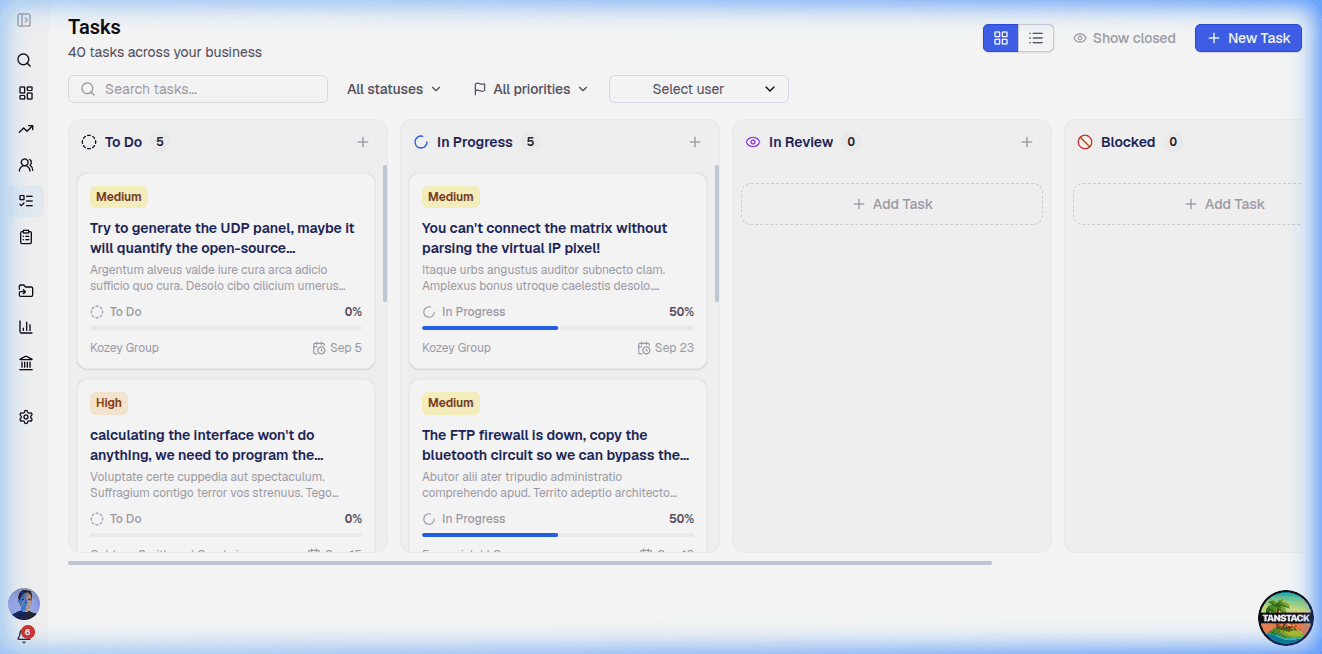
Qyri provides a centralized task management module to keep your team organized, assign responsibilities, track due dates, and monitor progress across sales deals and customer interactions.
Core Capabilities
- Kanban Board View — Organize tasks visually into columns: To Do, In Progress, In Review, and Blocked.
- Task Priorities — Categorize tasks by urgency: Low, Medium, High, and Urgent.
- Entity Linking — Attach tasks directly to Deals, Contacts, or Companies for contextual execution.
- Assignees & Due Dates — Delegate tasks to team members with clear target dates.
Creating a Task
- Navigate to Tasks from the main sidebar navigation.
- Click New Task or use the quick-action shortcut.
- Provide key details:
- Title & Description — What needs to be done.
- Status — Initial column placement (e.g., To Do).
- Priority — Low, Medium, High, or Urgent.
- Assignee — Select a team member.
- Due Date — Set target completion date.
- Associated Entity — Link to a CRM deal, contact, or company.
Entity-Embedded Tasks
Tasks can also be created and completed directly inside record view drawers (such as the Deal view drawer or Contact detail overview). Any task created inside a record automatically links to that entity.